
Background
In recent years, a lot of companies are moving toward microservices and cloud-native architecture to accelerate delivery. Most of them use Docker.
But there is an issue:
Security is often treated as an afterthought, not part of the development lifecycle.
In reality:
- Many public Docker images contain known vulnerabilities (CVEs)
- Developers frequently use base images without security validation
- CI/CD pipelines focus on “successful deployment,” not “secure deployment”
As a result:
- Production images may contain exploitable vulnerabilities
- Attackers can leverage unpatched packages
- Risks of data breaches and system compromise increase
This is why DevSecOps is becoming the standard—where security is integrated from the beginning, not added at the end.
Studies show an average of 300–400+ vulnerabilities per container image
https://pmc.ncbi.nlm.nih.gov/articles/PMC8173661/?utm_source=chatgpt.com
These can lead to:
- Remote code execution
- Privilege escalation
- Data breaches
Implementation
Required Tools:
- aws-cli
- Docker
- AWS ECR
Let’s discuss about the common risks in docker images.
- Outdated Image
e.g.FROM node:14 - Vulnerable Dependencies
Packages used by services, e.g.package.json - Unpatched OS Packages
Underlying OS layers may not be updated
Now, we create the sample for this.
touch app.js
touch package.json
touch Dockerfile
app.js:
const http = require("http");

const server = http.createServer((req, res) => {
    res.end("Hello from Docker + AWS 🚀");
});

server.listen(3000, () => {
    console.log("Server running on port 3000");
});
package.json:
{
    "name": "docker-aws-demo",
    "version": "1.0.0",
    "main": "app.js",
    "dependencies": {}
}
Dockerfile:
# Base image
FROM node:18-alpine

# Set working directory
WORKDIR /app

# Copy file
COPY package.json .
COPY app.js .

# Install dependency (kalau ada)
RUN npm install

# Expose port
EXPOSE 3000

# Run app
CMD ["node", "app.js"]
Build, with this command
$ docker build -t my-app:latest .
(Optional) Create repository, if you don’t have any yet.
$ aws ecr create-repository \
--repository-name $repo-name \
--region $region
Tag your Docker image with your AWS account ID so it can be pushed to Amazon ECR.
$ docker tag my-app:latest $account_id.dkr.ecr.$region.amazonaws.com/my-app:latest
Push the image
$ docker push $account_id.dkr.ecr.$region.amazonaws.com/my-app:latest
You can check the pushed specific image, and choose “Scan”.
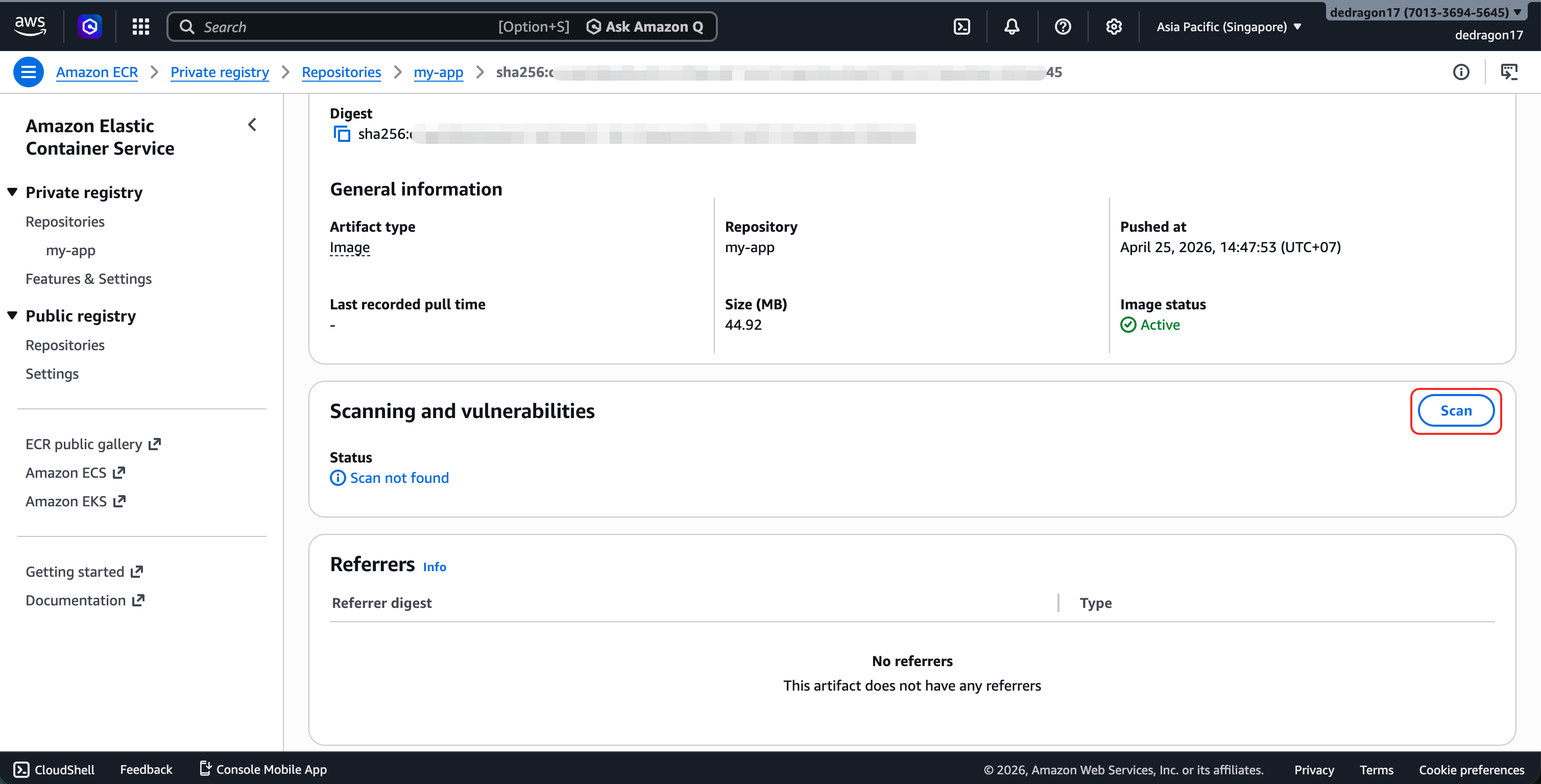
Results will be displayed after the scanning process is complete.
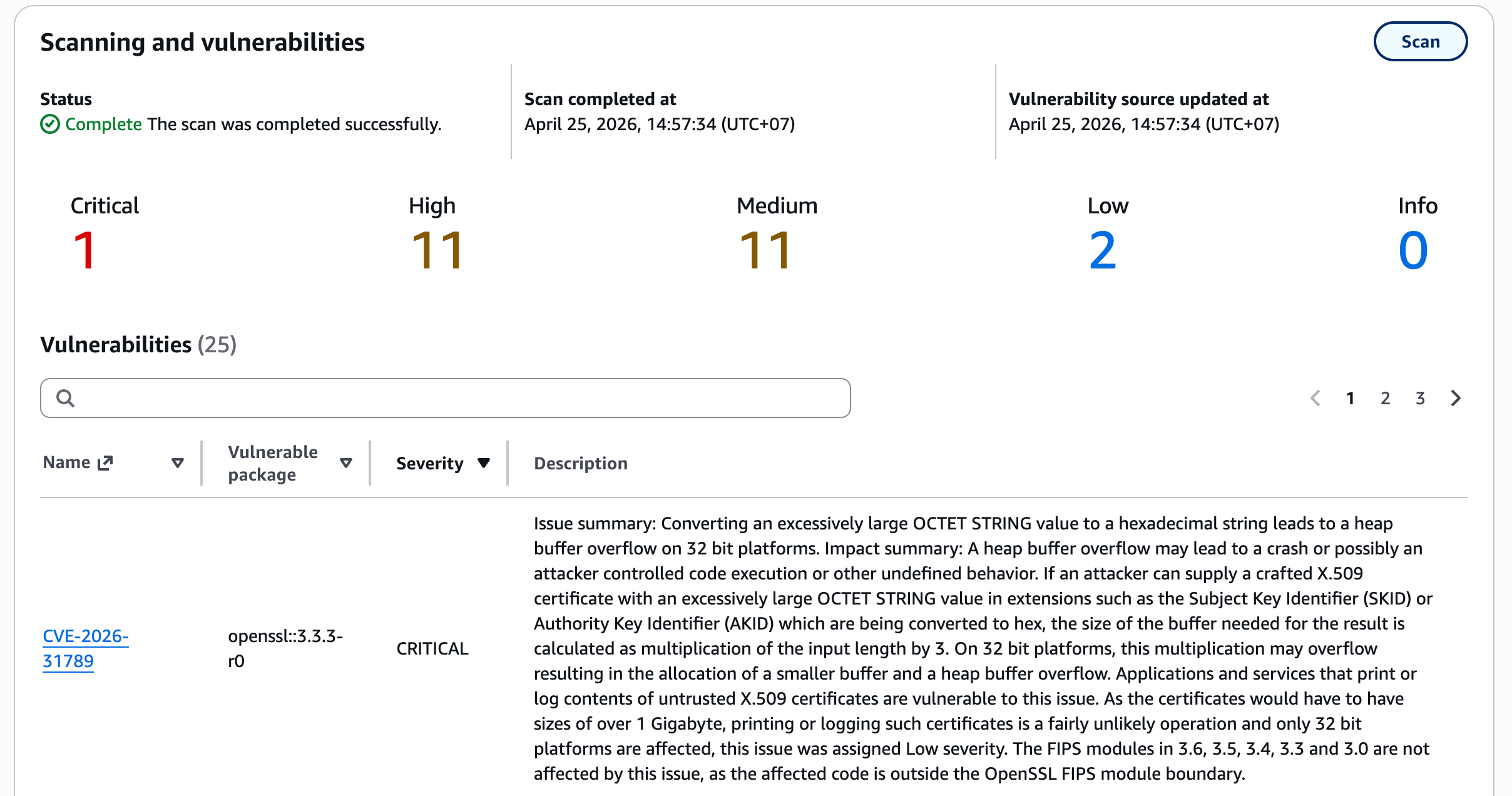
You can see some vulnerabilities with the severity level.
Conclusion
Docker accelerates development and deployment. However, without proper security controls, that speed can also amplify risk.
Many vulnerabilities in container images do not come from your own code, but from base images and dependencies. Without proper scanning, deployments are essentially done “blind”.
An image that builds successfully is not necessarily secure. A secure image is one that has been verified.
Later, we can explore about image scanning in pipeline.

