
Background
In recent years, teams have transformed how they build and deploy applications. With the rise of containerization and cloud platforms, development teams can now deliver software faster, scale more efficiently, and iterate rapidly.
However, many organizations still overlook a critical aspect:
How do we securely manage sensitive data such as passwords, API keys, and credentials?
In many engineering teams, .env Files are still the default approach. The reason is simple—they are easy to use, quick to set up, and widely adopted across development workflows.
A typical example looks like this:
DB_PASSWORD=password123
API_KEY=api123456
While this works well in local development, it becomes problematic in production environments.
In real-world scenarios, .env files often:
- Developers accidentally commit secrets to repositories
- Exist across multiple environments without proper control
- Lacks any form of rotation strategy
- Provides little to no visibility into who has access
More importantly, many security incidents originate from simple misconfigurations like this—sensitive credentials stored in insecure locations.
As modern architectures evolve, applications no longer run on a single server. Instead, they run across distributed environments such as:
- EC2 instances
- Container platforms (ECS / Kubernetes)
- Serverless services like Lambda
With this level of complexity, managing secrets through local files is not only insecure—it is also not scalable.
This is where the concept of secret management becomes essential in DevSecOps practices.
Instead of storing credentials manually, teams should:
- Centralize secret storage
- Control access using IAM
- Enable regular rotation
- Avoid hardcoding secrets in codebases
AWS provides dedicated services to address this challenge:
- Secrets Manager
- Systems Manager Parameter Store
Consequently, organizations that leverage these services can significantly improve their security posture while making their systems more scalable and maintainable.
In this article, we will walk through how to move away from .env files and adopt a more secure, production-ready approach—complete with step-by-step implementation.
Implementation
In many applications, secret management starts with a simple approach: storing credentials in .env files. While this works well for local development, it introduces several risks when applied to production systems.
To better understand the limitations, let’s first look at a typical .env-based implementation.
Step 0: Conventional Way
Usually use .env for your code.
As an example, we create 2 files app.js and .env.
app.js:
# example
import dotenv from "dotenv";
dotenv.config();

const dbConfig = {
    host: process.env.DB_HOST,
    user: process.env.DB_USER,
    password: process.env.DB_PASSWORD,
};

console.log("DB Config:", dbConfig);.env:
DB_HOST=localhost
DB_USER=admin
DB_PASSWORD=password123
And the result will be like this:

We don’t want to use the conventional way, and try to use a better method!
The question now is: how do we actually implement this in a real-world setup?
Let’s walk through a step-by-step approach using AWS to securely store and retrieve secrets.
Step 1: Store Your Secret in AWS
Required tools:
- aws-cli
- nodejs
- npm install @aws-sdk/client-ssm
- npm install @aws-sdk/client-secrets-manager
Option A: Secrets Manager
# example
aws secretsmanager create-secret \
  --name my-app/db-password \
  --secret-string "password123"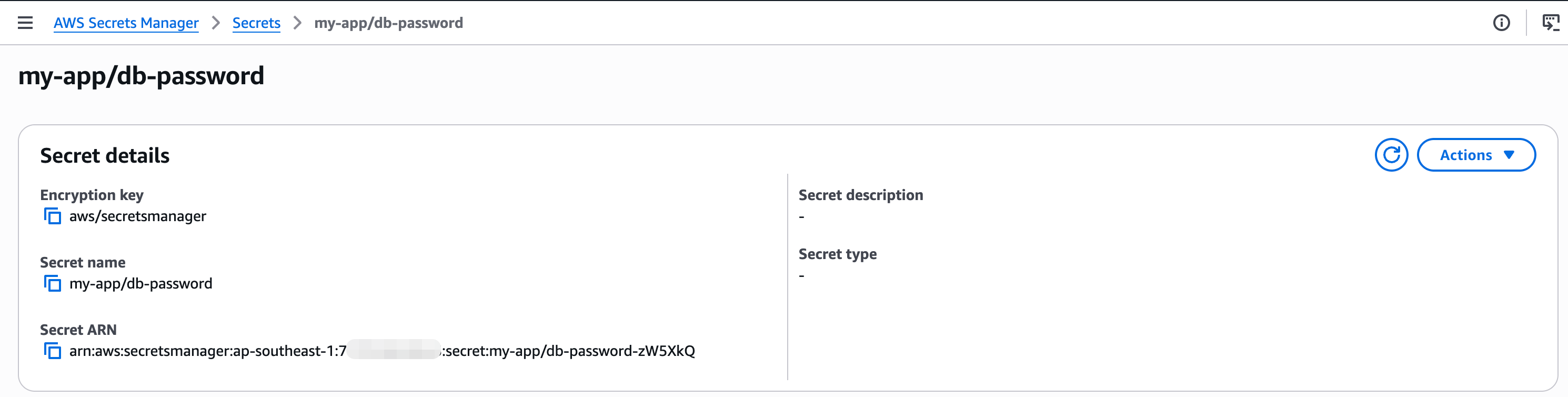
Option B: Parameter Store
# example
aws ssm put-parameter \
  --name "/my-app/db-password" \
  --value "password123" \
  --type SecureString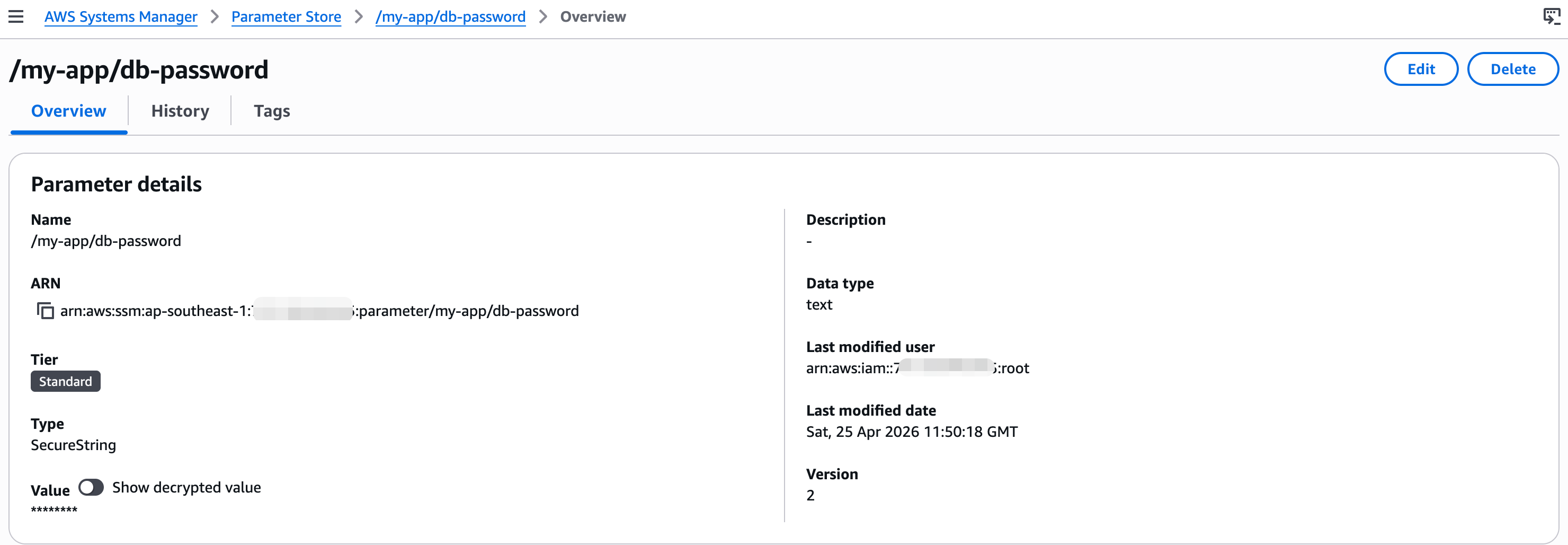
Step 2: Ensure IAM Permission Configuration
# example
{
  "Effect": "Allow",
  "Action": [
    "secretsmanager:GetSecretValue",
    "ssm:GetParameter"
  ],
  "Resource": "*"
}
Step 3: Retrieve Secrets From Services
1. Install AWS SDK
$ npm install @aws-sdk/client-secrets-manager @aws-sdk/client-ssm2. Retrieve Secrets: Secrets Manager
secret-manager-svc.js:
# example for secret manager
import { SecretsManagerClient, GetSecretValueCommand } from "@aws-sdk/client-secrets-manager";

const client = new SecretsManagerClient({
  region: "ap-southeast-1",
});

let cachedSecret = null;

export const getDBPasswordFromSecretsManager = async () => {
  try {
    if (cachedSecret) return cachedSecret;

    const command = new GetSecretValueCommand({
      SecretId: "my-app/db-password",
    });

    const response = await client.send(command);

    cachedSecret = response.SecretString;

    return cachedSecret;
  } catch (error) {
    console.error("Secrets Manager Error:", error);
    throw error;
  }
};
3. Retrieve Secrets: Parameter Store
paramstore-svc.js:
# example for parameter store
import { SSMClient, GetParameterCommand } from "@aws-sdk/client-ssm";

const client = new SSMClient({ region: "ap-southeast-1" });

let cachedValue = null;

export const getDBPasswordFromSSM = async () => {
    try {
        if (cachedValue) {
            console.log("[SSM] Using cached value");
            return cachedValue;
        }

        console.log("[SSM] Fetching parameter from Parameter Store...");

        const command = new GetParameterCommand({
            Name: "/my-app/db-password",
            WithDecryption: true,
        });

        const response = await client.send(command);
        cachedValue = response.Parameter.Value;

        console.log("[SSM] Successfully retrieved parameter");

        return cachedValue;
    } catch (error) {
        console.error("[SSM] Error:", error.message);
        throw error;
    }
};
4. Adjust Main Service
and, for app.js We will adjust the code like this:
# example
import { getDBPasswordFromSSM } from "./paramstore-svc.js";
// import { getDBPasswordFromSecretsManager } from "./secret-manager-svc.js";

const startApp = async () => {
  try {
    console.log("[APP] Starting application...");

    const dbPassword = await getDBPasswordFromSSM();
    // const dbPassword = await getDBPasswordFromSecretsManager();

    const dbConfig = {
      host: "localhost",
      user: "admin",
      password: dbPassword,
    };

    console.log("[APP] DB Config loaded successfully");
    console.log("DB Config:", dbConfig);
  } catch (error) {
    console.error("[APP] Failed to start:", error.message);
  }
};

startApp();
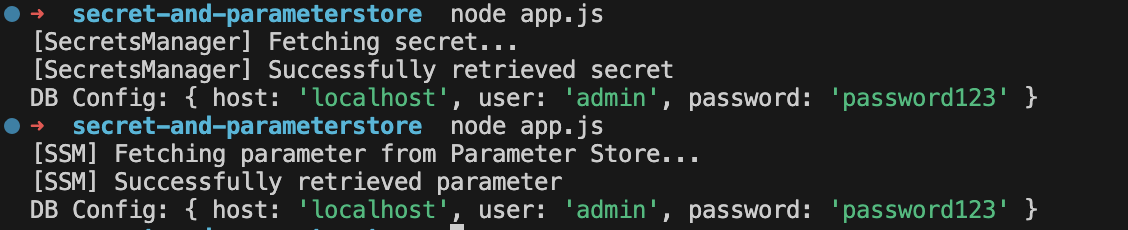
So that, if we use paramstore-svc.js or secret-manager-svc.js, the result:
Conclusion
After implementing both approaches using AWS Secrets Manager and AWS Systems Manager Parameter Store, the difference from traditional .env usage becomes clear.
Instead of relying on static configuration files, secrets are now retrieved dynamically at runtime with centralized access control through IAM.
With a simple abstraction layer and caching, the application becomes more flexible and efficient without tightly coupling secret management to the core logic.
Another key improvement is secret rotation, especially with AWS Secrets Manager, which allows credentials to be automatically rotated without manual intervention—reducing long-term security risks.
Overall, this approach shifts secrets management from file-based storage to a secure, centralized, and rotation-ready system.

